Sandbox defaults (writable places, unreadable places, destinations)
This page summarizes which folders a scenario inside the sandbox can read and write, and where it can connect. For how the sandbox works, see Checking the sandbox and opening the holes you need.
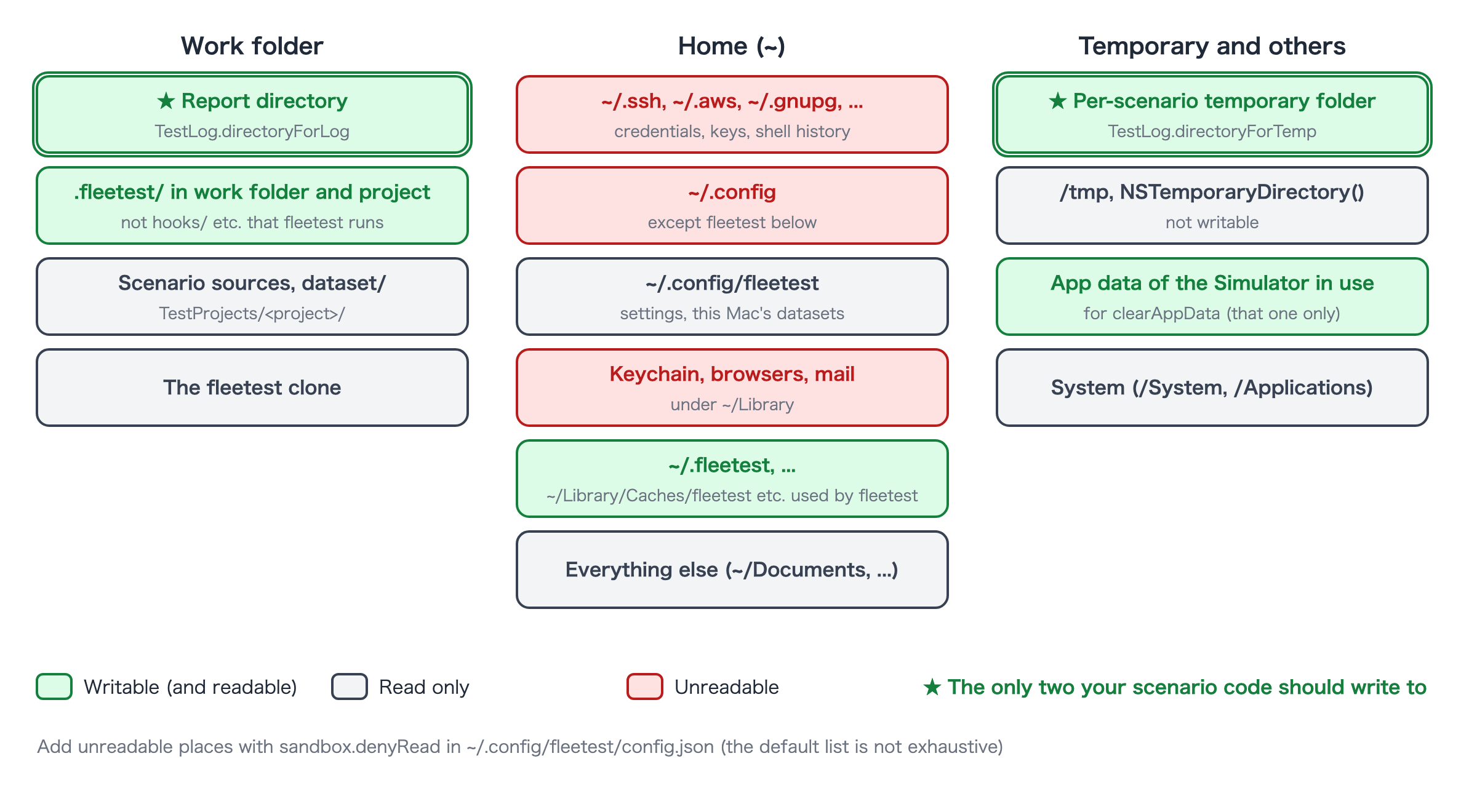
Writable folders
When your scenario code writes files, use only these two.
| Folder | Description |
|---|---|
TestLog.directoryForLog |
The output folder of this test class. Kept together with the report |
TestLog.directoryForTemp |
A temporary folder for this scenario only. Deleted when the scenario ends |
There are other places that are writable because fleetest itself uses them (they are not for your scenario code).
| Place | Used for |
|---|---|
| The report directory | Results, screenshots, logs |
.fleetest/ in the project, the work folder and the fleetest clone, ~/.fleetest/ |
fleetest's state. Things fleetest itself reads and runs or distributes in the next run or when preparing devices (such as hooks/, the bridge ledgers and DerivedData*) are not writable |
~/Library/Logs/fleetest, ~/Library/Caches/fleetest |
Logs, serializing Apple Intelligence calls |
~/Library/Caches/<scenario binary name>, ~/Library/HTTPStorages/<scenario binary name> |
Model cache for image matching, the default store of URLSession |
| App data of all apps on the Simulator the scenario is using (including apps other than the one under test) | So that clearAppData can delete data (other Simulators' data is not writable) |
Examples of places you cannot write: the scenario sources and other project files, the fleetest clone (except its .fleetest/), the rest
of your home folder, /tmp, and the location returned by NSTemporaryDirectory() or
FileManager.default.temporaryDirectory (writing fails with "You don’t have permission").
Readable folders
Reading is allowed except for the list below (the project, datasets, fleetest itself and so on are readable). What is unreadable by default is the usual places for credentials and personal data.
| Kind | Unreadable places (relative to home) |
|---|---|
| Credentials and keys | .ssh, .aws, .azure, .gnupg, .kube, .docker, .config (but config.json and the running project's dataset under .config/fleetest are readable), .netrc, .git-credentials, .npmrc, .pypirc, .pgpass, .vault-token, .terraform.d |
| AI assistant settings | .claude, .claude.json, .codex |
| Build and distribution credentials | .gradle, .m2, .gem/credentials, .cargo/credentials (and .toml), .pub-cache/credentials.json, .yarnrc, .yarnrc.yml, .bundle/config, .appstoreconnect, private_keys, .private_keys, .fastlane, .expo |
| Android keys | .android (adb keys), .emulator_console_auth_token (readable when the machine setting sandbox.allowDirectAdb: true is on) |
| Keychain and app data | Library/Keychains, Library/Cookies, Library/Safari, Library/Mail, Library/Messages, the profiles of Chrome, Firefox, Edge, Brave and Arc, app data of VSCode, Cursor, Slack and Claude |
| Shell history | .zsh_history, .zsh_sessions, .bash_history, .bash_sessions, .python_history, .node_repl_history, .psql_history, .mysql_history |
- This list is not exhaustive. If you keep secrets somewhere not listed, add it to
sandbox.denyReadin the settings (it is added to the default list; it does not replace it). - Under
~/.config/fleetest, onlyconfig.jsonand the running project's dataset (~/.config/fleetest/dataset/<project name>/) are readable, so thataccount(),data()anddataFile()can read the values for this Mac only. Other projects' datasets cannot be read. None of them can be written.
Environment variables
Only the environment variables fleetest uses are passed to scenarios (PATH, HOME, USER, LANG,
DEVELOPER_DIR, JAVA_HOME, ANDROID_HOME and so on, plus those starting with FT_ / LC_). Tokens set in your
shell or in the env of .mcp.json are not visible, except that names starting with FT_ are passed, so do not use
them for secrets. Put secrets a scenario needs in this Mac's file for
account().
Destinations
| Destination | Reachable? |
|---|---|
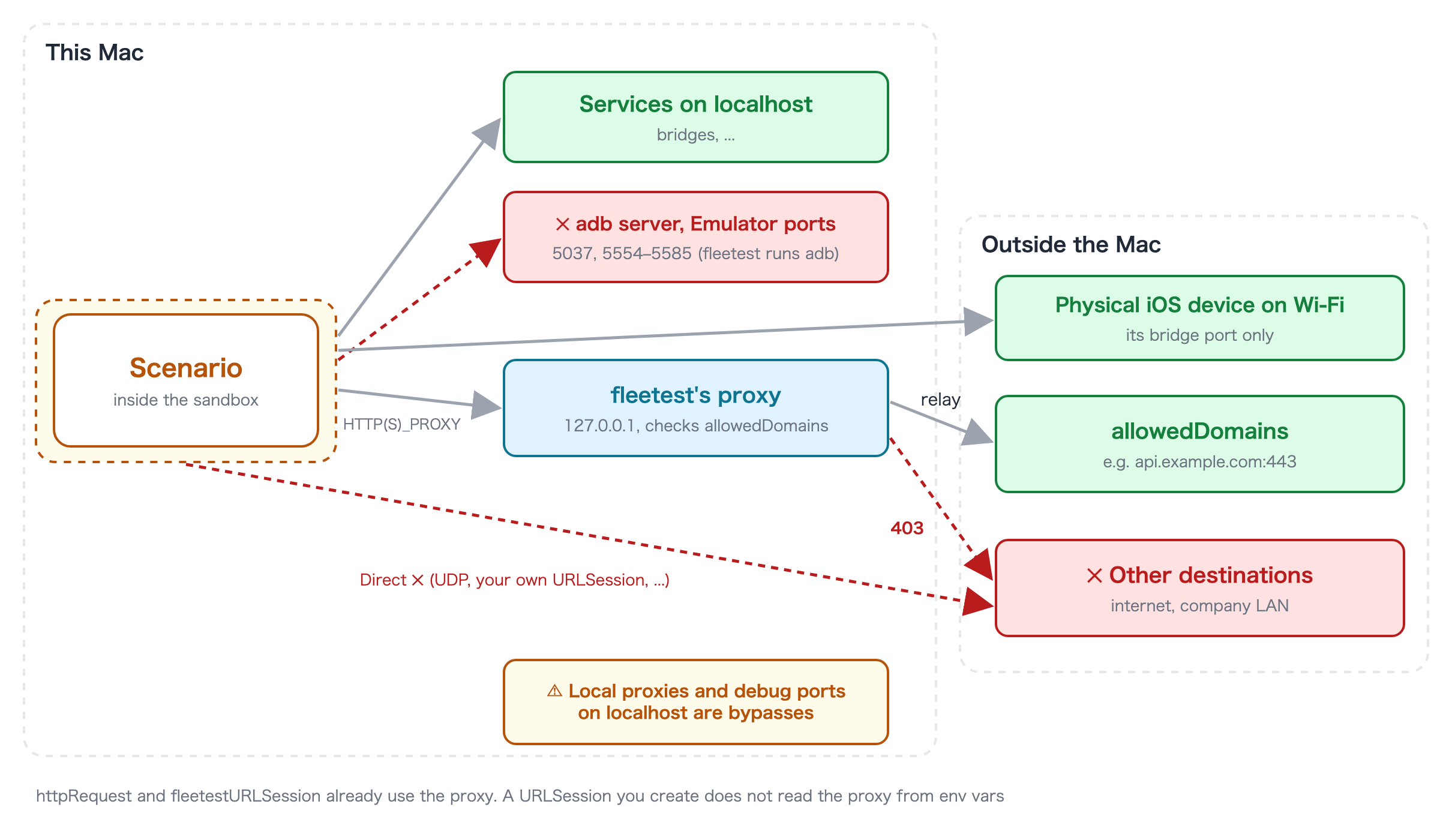
| This Mac's localhost (bridges and so on) | Yes. Only the adb server (5037 by default), the Emulator ports (5554–5585) and Docker's API published on TCP (2375 / 2376) are closed |
| The bridge of a physical iOS device connected over Wi-Fi | Yes, through fleetest's relay on this Mac's localhost (the same shape as a USB tunnel). The relay exists only while that scenario runs and connects only to that device's bridge. No other host is reachable |
Destinations listed in sandbox.allowedDomains |
Yes, through fleetest's proxy |
| Anything else (the internet, the company LAN) | No |
To allow an external destination, write it in ~/.config/fleetest/config.json on the Mac that runs the scenario.
{
  "sandbox": {
    "allowedDomains": ["api.example.com:443", "*.example.org"]
  }
}
*.example.orgmatches subdomains only; it does not includeexample.orgitself.- A line without a port lets every port of that host through. If you know the port, write it.
- Connections that do not go through the proxy cannot reach even allowed destinations.
httpRequestandfleetestURLSessionalready use the proxy. AURLSessionyou create yourself does not read the proxy from environment variables, so it cannot connect as is.
The full syntax, how to connect and how to read failures are in Network access from scenarios.
Settings file
All keys of the machine settings (~/.config/fleetest/config.json), including sandbox.allowedDomains and sandbox.denyRead on this page, are listed in Machine settings (config.json).