Checking the sandbox and opening the holes you need
A follow-up to the Quick start: you see what the sandbox around scenarios stops, then open only what you need. It assumes you have finished the Quick start (there is one scenario for the sample app SUT Store and you can run it on a device).
fleetest always runs scenarios (.swift) inside the macOS sandbox (Seatbelt). Scenarios are often written by an AI
assistant, and you may run scenarios received from others, so wrong or malicious code could read this Mac's secrets and
send them out. The OS refuses what is not allowed, whatever the scenario's code says.
| What it protects | What a scenario cannot do |
|---|---|
| This Mac's secrets | Read the usual places for credentials, such as ~/.ssh, the keychain and browser profiles |
| This Mac's files | Write anywhere but the report output folder, the temporary folder, fleetest's state and cache folders and the app data of that scenario's Simulator (see Sandbox defaults for the list) |
| Outbound traffic | Talk to a destination that is not allowed |
| Other programs | Start other apps, or drive Simulators and Android devices other than in fixed ways |
| The launching environment | Read environment variables such as tokens put in the shell or .mcp.json |
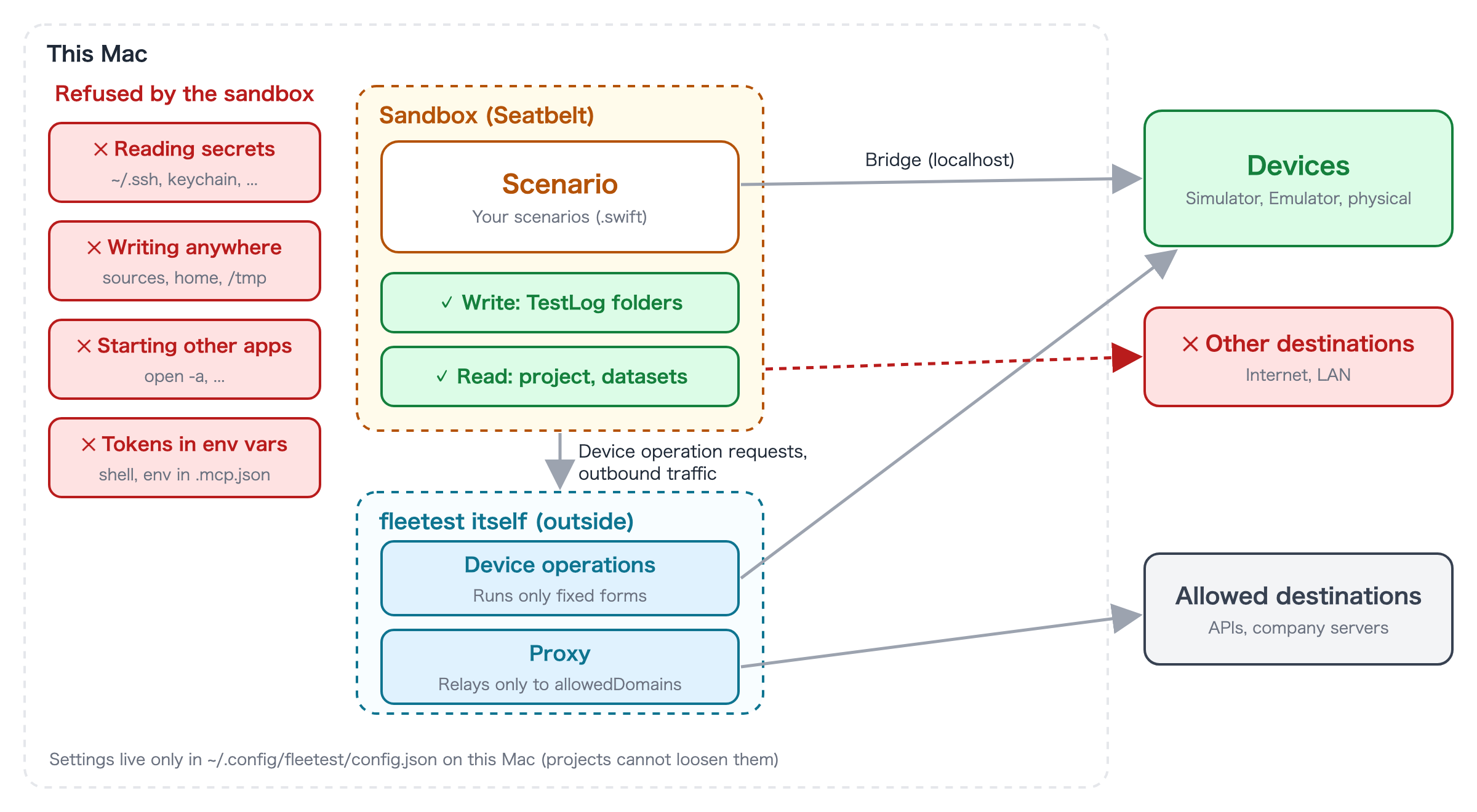
Device operations (tap, installApp and so on) and outbound traffic are done or relayed by fleetest itself, outside
the frame. How you write the DSL does not change.
1. See where it stops
You write a scenario that checks the stops, and run it. Three things fail here (the failures are the correct result).
- Writing a file somewhere else in the home folder (
~/Desktop) - Reading
~/.ssh - Going out with
httpRequest(https://example.com)
Prompt for the AI
Create a scenario that checks what the sandbox stops, in a class named SandboxCheck. Make three @Test methods:
S0010 writes ~/Desktop/fleetest-sandbox-check.txt, S0020 reads the contents of ~/.ssh, and S0030 fetches https://example.com with httpRequest and checks that the status is 200.
Write each inside a procedure and throw errors as they are. Then run it on iOS and show me the three failure messages.
If you do it manually (click to show details)
Create TestProjects/project1/scenarios/SandboxCheck.swift.
import FTDSL
import Foundation

@TestClass
class SandboxCheck {

    @Test("Write somewhere else in the home folder")
    func S0010() {
        scenario {
            scene(1, "Write to the Desktop") {
                action {
                    procedure("Write to ~/Desktop") {
                        let path = NSHomeDirectory() + "/Desktop/fleetest-sandbox-check.txt"
                        try "x".write(toFile: path, atomically: true, encoding: .utf8)
                    }
                }
            }
        }
    }

    @Test("Read ~/.ssh")
    func S0020() {
        scenario {
            scene(1, "Read a credentials place") {
                action {
                    procedure("Read ~/.ssh") {
                        _ = try FileManager.default.contentsOfDirectory(atPath: NSHomeDirectory() + "/.ssh")
                    }
                }
            }
        }
    }

    @Test("Talk to the outside")
    func S0030() {
        scenario {
            scene(1, "Fetch example.com") {
                action {
                    let response = httpRequest("https://example.com")
                    response.status.thisIs(200)
                }
            }
        }
    }
}
Run it (--profile is the run profile prepared in step 5 of the Quick start).
../fleetest/.build/debug/fleetest run --profile ios-run --scenario SandboxCheck
To run just one, pass class.method, such as --scenario SandboxCheck.S0030.
On a Mac without ~/.ssh, you cannot tell "unreadable" from "not there". Check with ls -d ~/.ssh first.
Running it makes all three fail (that is the expected result). The report (TestProjects/project1/reports/) shows these failure messages.
- S0010:
You don’t have permission to save the file “fleetest-sandbox-check.txt” in the folder “Desktop”.(it cannot write) - S0020:
The folder “.ssh” doesn’t exist.(an unreadable place looks as if it did not exist: it is on the Mac, but invisible from inside the frame) - S0030:
A server with the specified hostname could not be found. (NSURLErrorDomain -1003)(withoutallowedDomainsno outbound route (the proxy) is set up, so even name resolution fails. WhenallowedDomainslists other hosts only, the proxy refuses the connection, the request fails withkCFErrorDomainCFNetwork error 310, and the message adds a note that the connection goes through the sandbox proxy and that hosts not inallowedDomainsare refused)
When failures pile up on the same device, the run's check for a broken device kicks in and prints the warning
3 consecutive scenario failures on this lane … keeping the lane (only when some scenario passed on another device meanwhile does it
restart the worker and run the last one again; that adds some ten seconds and does not change the result). A test that only has a
procedure also gets a "no assertions" warning; here that is intended.
The list of places that cannot be written, read or reached is in Sandbox defaults.
2. Open outbound traffic
Only the destinations you write in ~/.config/fleetest/config.json on the Mac that runs the scenarios are opened.
A person on this Mac writes this file by hand (step 8). Write the following (create the file if it does not exist).
{
  "sandbox": {
    "allowedDomains": ["example.com:443"]
  }
}
You write the port because, without it, every port of the host (including other services such as databases) is reachable. The setting takes effect from the next scenario launch, so run the same scenario as in step 1 again.
Prompt for the AI
Run only S0030 of SandboxCheck on iOS and show me the result.
If you do it manually (click to show details)
../fleetest/.build/debug/fleetest run --profile ios-run --scenario SandboxCheck.S0030
Running it again makes S0030 pass (S0010 and S0020 are still refused).
How to write allowedDomains (such as the *.example.org wildcard) and how to read a failed connection are in
Network access from scenarios.
3. Where to write
When you want to write files, use the fixed doors instead of opening a hole. TestLog.directoryForLog (kept with the
report) and TestLog.directoryForTemp (deleted when the scenario ends) are writable.
Prompt for the AI
Add S0040 to SandboxCheck. Write note.txt to TestLog.directoryForLog and work.txt to TestLog.directoryForTemp, nothing else. Run S0040 on iOS and tell me where note.txt ended up.
If you do it manually (click to show details)
Add this to the SandboxCheck class.
    @Test("Write to the TestLog folders")
    func S0040() {
        scenario {
            scene(1, "Write to the fixed doors") {
                action {
                    procedure("Write to the TestLog folders") {
                        let note = TestLog.directoryForLog.appendingPathComponent("note.txt")
                        try "ok".write(to: note, atomically: true, encoding: .utf8)
                        let work = TestLog.directoryForTemp.appendingPathComponent("work.txt")
                        try "ok".write(to: work, atomically: true, encoding: .utf8)
                    }
                }
            }
        }
    }
../fleetest/.build/debug/fleetest run --profile ios-run --scenario SandboxCheck.S0040
Running it makes S0040 pass, and note.txt stays under the class name in that run's output folder (work.txt is deleted
when the scenario ends). Details: Output folder and temporary folder (TestLog).
Only when the scripts that run before and after a run (run-setup.sh / run-teardown.sh), which also run inside the sandbox,
have to write somewhere other than <workspace>/data/, add the place to hooks.writablePaths in the machine settings.
{
  "hooks": {
    "writablePaths": ["~/work/shared-fixtures"]
  }
}
How to write the scripts is in "Running scripts before and after a run" of Adding your own features.
4. How to pass secrets
Shell environment variables (tokens and so on) are not visible to scenarios (only the variables fleetest uses, such as PATH, and names starting with FT_ / LC_ are passed, so do not give secrets such names). Put the secrets a scenario uses in the
dataset file that exists only on this Mac
(~/.config/fleetest/dataset/<project name>/accounts.json; the project name is the project's folder name) and read
them with account(). A person on this Mac creates the file by hand (step 8).
{
  "[demo]": { "token": "dummy-token-1234" }
}
Prompt for the AI
Add S0050 to SandboxCheck. Check that the environment variable DEMO_TOKEN looks empty to the scenario (thisIsEmpty) and that account("[demo].token") is not empty (thisIsNotEmpty).
Run S0050 on iOS with fleetest run, with DEMO_TOKEN=dummy in front, and show me the result. Do not print the values themselves.
If you do it manually (click to show details)
Add this to the SandboxCheck class.
    @Test("The environment variable is hidden and account() works")
    func S0050() {
        scenario {
            scene(1, "How to pass secrets") {
                action {
                    (ProcessInfo.processInfo.environment["DEMO_TOKEN"] ?? "").thisIsEmpty()
                    account("[demo].token").thisIsNotEmpty()
                }
            }
        }
    }
DEMO_TOKEN=dummy ../fleetest/.build/debug/fleetest run --profile ios-run --scenario SandboxCheck.S0050
If you run it before placing the dataset file, the account() step fails and the message lists every path it looked at
(not the values). After you place the file and run again, it passes. The variable looking empty is the sandbox at work.
Whether the account() value stays in the report is something you check in
Checking what a test leaves behind.
Where the files go and their format are in Test data and accounts (account, data, dataFile, addMedia).
5. Use adb directly
If a scenario calls adb directly, it is refused by default (device operations go through fleetest itself through the
DSL commands, so you normally do not need it). Only when you really need it, set sandbox.allowDirectAdb to true in
the machine settings.
{
  "sandbox": {
    "allowDirectAdb": true
  }
}
Once it is open, a scenario can reach the outside through the shell inside an Emulator and reach every connected
Android device. It also makes the adb keys (~/.android) readable. After you have checked, set it back to false. The Android SDK (adb) must be installed.
Prompt for the AI
Add S0060 to SandboxCheck. Run adb devices with Process and check that the output contains "List of devices attached".
Run S0060 on iOS and show me the result.
If you do it manually (click to show details)
Add this to the SandboxCheck class.
    @Test("Call adb from a scenario")
    func S0060() {
        scenario {
            scene(1, "adb devices") {
                action {
                    procedure("Run adb devices") {
                        let process = Process()
                        process.executableURL = URL(fileURLWithPath: "/usr/bin/env")
                        process.arguments = ["adb", "devices"]
                        let pipe = Pipe()
                        process.standardOutput = pipe
                        try process.run()
                        let data = pipe.fileHandleForReading.readDataToEndOfFile()
                        process.waitUntilExit()
                        let output = String(data: data, encoding: .utf8) ?? ""
                        guard output.contains("List of devices attached") else {
                            throw NSError(domain: "demo", code: 1,
                                          userInfo: [NSLocalizedDescriptionKey: "adb is not usable: \(output)"])
                        }
                    }
                }
            }
        }
    }
../fleetest/.build/debug/fleetest run --profile ios-run --scenario SandboxCheck.S0060
While allowDirectAdb is false, adb starts but cannot reach the adb server (port 5037), and S0060 fails with
adb: failed to check server version: cannot connect to daemon (the sandbox closes that port). Once it is true, S0060 passes. After you have checked, set it
back to false.
6. Add places that cannot be read (the other direction)
The default list of unreadable places is the usual places for credentials and is not exhaustive. If a secret is
somewhere that is not in the list, add it to sandbox.denyRead (it adds to the default list; it does not replace it).
Here you create a folder that stands for where you keep a secret, and watch it become unreadable.
Prompt for the AI
Create ~/fleetest-demo-secrets/note.txt with the contents hello.
Add S0070 to SandboxCheck that only reads that file (try inside a procedure). Run S0070 on iOS and show me the result.
If you do it manually (click to show details)
mkdir -p ~/fleetest-demo-secrets && echo hello > ~/fleetest-demo-secrets/note.txt
Add this to the SandboxCheck class.
    @Test("Read the added secret place")
    func S0070() {
        scenario {
            scene(1, "Read the demo folder") {
                action {
                    procedure("Read ~/fleetest-demo-secrets/note.txt") {
                        _ = try String(contentsOfFile: NSHomeDirectory() + "/fleetest-demo-secrets/note.txt", encoding: .utf8)
                    }
                }
            }
        }
    }
../fleetest/.build/debug/fleetest run --profile ios-run --scenario SandboxCheck.S0070
It is not in the list yet, so S0070 passes (it can read the file). Add the following to the machine settings and run again.
{
  "sandbox": {
    "denyRead": ["~/fleetest-demo-secrets"]
  }
}
Running it again makes S0070 fail with The file “note.txt” couldn’t be opened because you don’t have permission to view it.. After you have checked, remove the denyRead
line and ~/fleetest-demo-secrets.
7. Take everything off (only to isolate a cause)
Only when you want to tell whether a scenario fails with a permission error because of the sandbox or something else, you can take the whole sandbox off.
{
  "sandbox": {
    "disabled": true
  }
}
Run S0010 from step 1 again, and this time it can write and passes (~/Desktop/fleetest-sandbox-check.txt is created).
Prompt for the AI
Run only S0010 of SandboxCheck on iOS and show me the result.
If you do it manually (click to show details)
../fleetest/.build/debug/fleetest run --profile ios-run --scenario SandboxCheck.S0010
rm ~/Desktop/fleetest-sandbox-check.txt
After you have checked, always set disabled back to false (or delete the line) and delete the file it created.
If it works with the sandbox off, the scenario does something the sandbox refuses. Do not leave it off; rewrite it with
the fixed doors in steps 3 and 4.
8. Who can open holes
You have written every setting so far in ~/.config/fleetest/config.json on the Mac that runs the scenarios.
That file is the only place that can loosen the sandbox. The project, run profiles and environment variables cannot,
because the project is a place an AI assistant can rewrite, and a switch there would make the sandbox pointless.
Scenarios themselves cannot rewrite this file either. When you run on another Mac (a runner machine), that Mac's
settings are used.
With Claude Code, setup writes a deny rule Edit(~/.config/fleetest/**) into the work folder's .claude/settings.json,
so the AI assistant cannot change this folder with its file-editing tools. It does not stop writes made through shell commands, so check that a command the assistant proposes does not touch this folder before you approve it. Try it.
Prompt for the AI
Add example.org:443 to sandbox.allowedDomains in ~/.config/fleetest/config.json.
The assistant's edit is refused. If it then tries to write the file with a shell command, do not approve it; take the content and write it yourself.
The rule is written when the fleetest clone is outside the work folder, such as next to it (the Quick start layout). It is not written when the work folder is inside the clone.
Good to know
- There are things the sandbox does not stop (operations on the app under test, services on this Mac's localhost and so on). The points for judging are in Notes and limitations.
- It is always on. Whether you run with
fleetest run, a dry-run, MCP, the VSCode extension or a runner machine, the scenario runs inside the frame. The only exception issandbox.disabled: truein the machine settings of the Mac that runs it; then every scenario prints⚠️ sandbox: disabled on this Mac(on a runner machine that Mac's settings apply, so this line is how you notice). - The scripts that run before and after a run (
run-setup.sh/run-teardown.sh) run in a separate sandbox of their own. They can write only to<workspace>/data/andhooks.writablePaths, and connect only to compose.yaml's published ports and theallowedDomainsproxy. - Only the scenario binary and its descendants go into the sandbox. fleetest itself, the app under test, evaluating
Package.swiftand building dependencies run outside.services.buildSources, which widens the places a compose.yamlbuild:may refer to, is in Services the app depends on (compose.yaml). - It adds only some ten milliseconds per launch, which barely shows in the total test time.
- The list of setting keys is in Machine settings (config.json), and the default writable places, unreadable places and destinations are in Sandbox defaults.
- Features that make it easy to write inside the frame, such as using external Swift packages or passing values between scenarios, are in Helpful features for writing test code.
Next
- See what a test leaves behind: Checking what a test leaves behind
- Know what is not stopped: Notes and limitations
- Know the network exposure: Network exposure and security