Running tests
Run all the tests you have created in project1 so far.
1. Run
Prompt for the AI
Run project1 on iOS (ios-run) and report the results when it's done.
If you do it manually (click to show details)
# Everything
../fleetest/.build/debug/fleetest run --project project1 --profile ios-run

# Per class (file) or per single test
../fleetest/.build/debug/fleetest run --project project1 --profile ios-run --scenario <ClassName>
../fleetest/.build/debug/fleetest run --project project1 --profile ios-run --scenario <ClassName>.<methodName>
<ClassName> is the scenario's class name (it is inside the Swift file under scenarios/).
In VSCode, select a scenario in the Test Explorer and click "Run" (choose the run profile with
fleetest: Select Run Profile in the Command Palette; if there is only one, it is selected automatically).
Expected result:
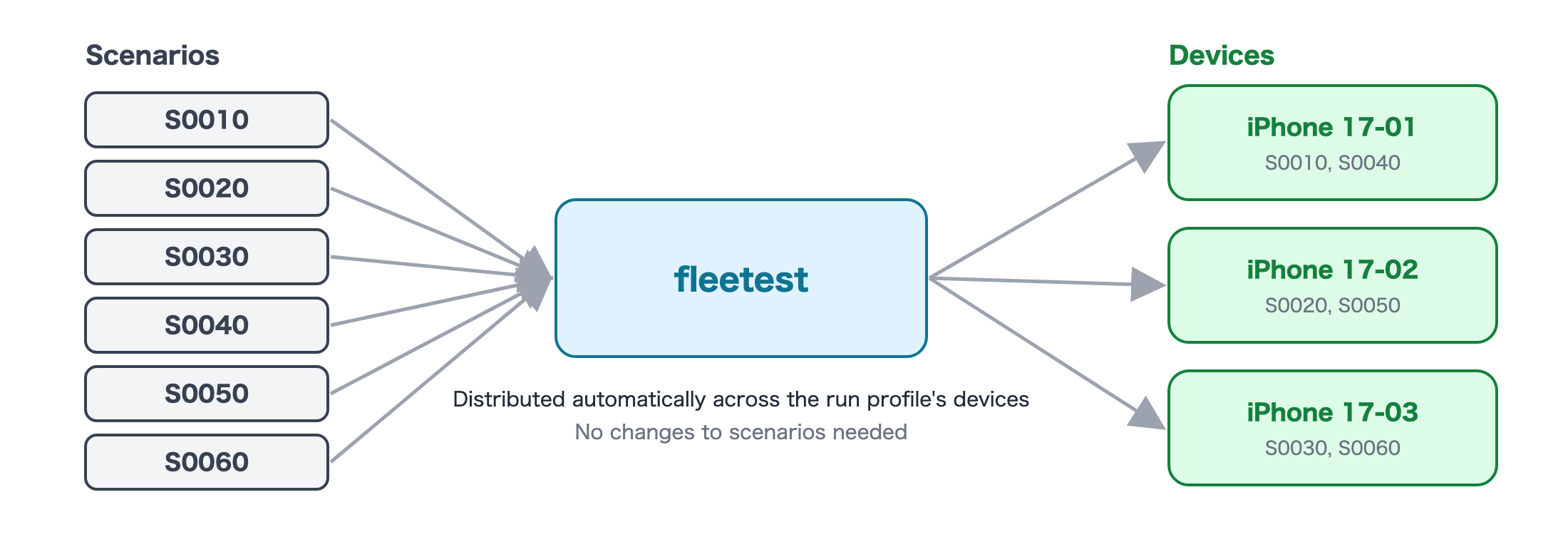
ios-rundefines several devices. The scenarios are distributed to them automatically and run in parallel (the image below is an example with six scenarios and three devices).- All three tests (one that opens the product details and two that add to the cart) succeed.
Next: Reading results and investigating failures