Response measurement
Run your existing scenarios on a physical device and measure, step by step, how long the app takes to react to an action and how long until the next action becomes possible. The values are kept in the results and can be compared with the previous measurement on the same machine and the same device.
Works with one Android or iOS physical device (not the Simulator or the Emulator).
What is measured
For every step that moves the screen (tap, swipe, scroll, …) the run records the values below. Verification steps (exist, …)
and select steps are not measured.
| Value | Meaning |
|---|---|
Time to first frame (firstFrameMs) |
From injecting the input to the first frame the app presents |
Time until ready (readyMs) |
From injecting the input until the element the scenario operates next can be found, is enabled, is not covered by another element and has stopped moving |
All times are taken on the device's clock, so the communication time between the Mac and the device is not included.
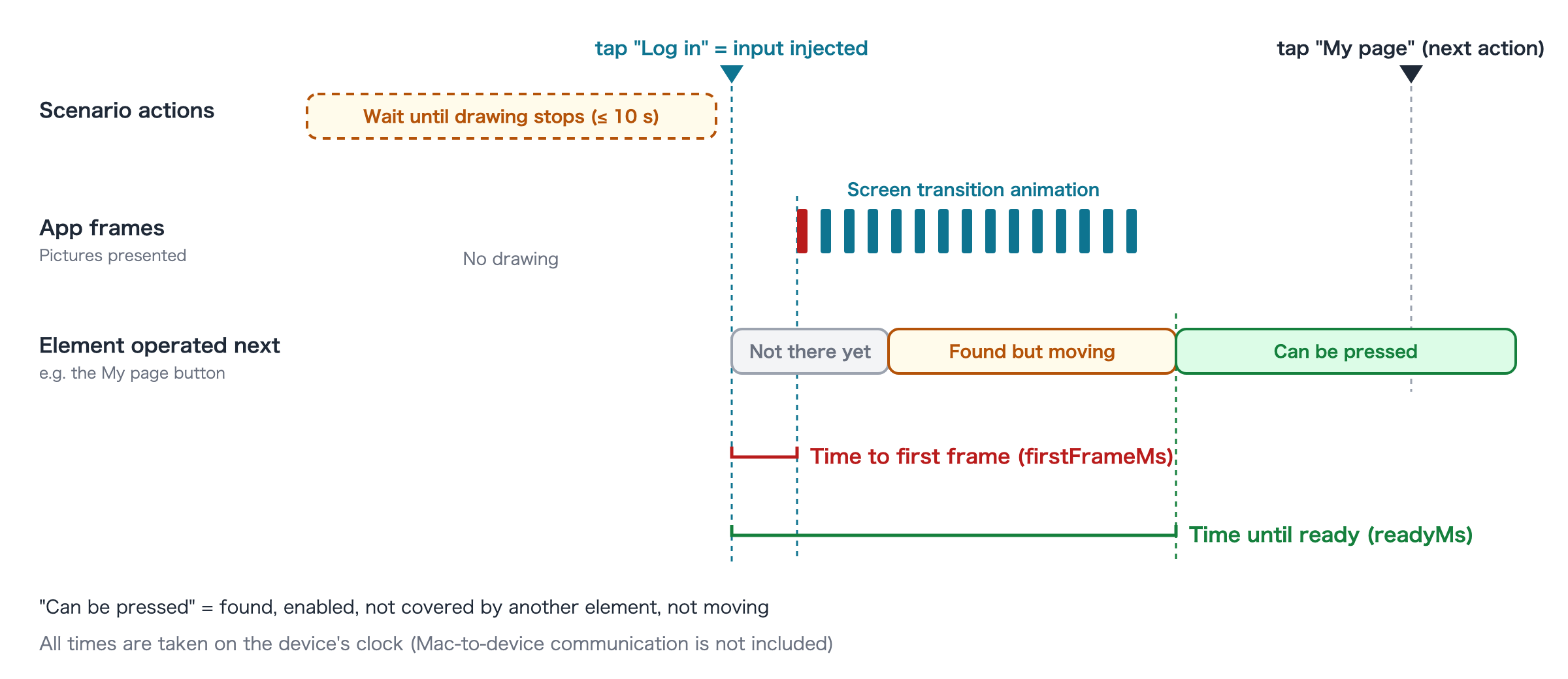
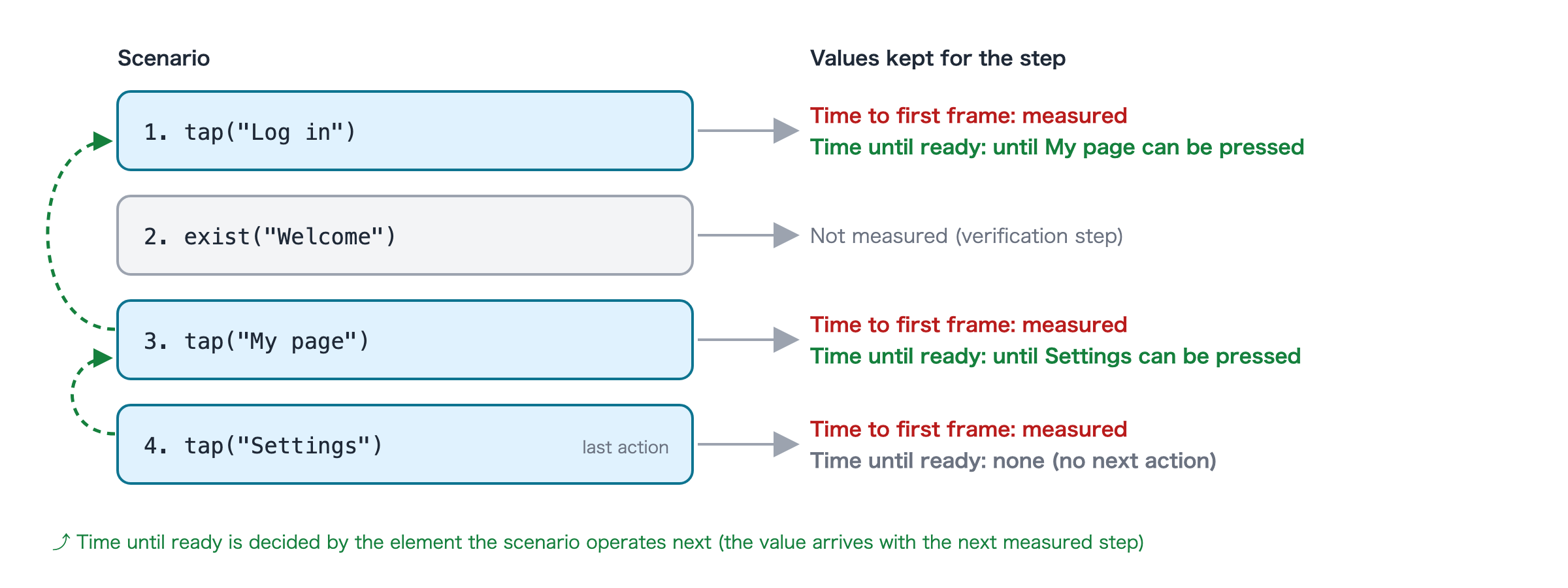
Time until ready is decided by the element the scenario actually operates next. If a scenario taps "Log in" and then taps "My page", the value for "Log in" is "from the tap until the My page button can be pressed".
Turning it on
Write responseMeasurement: true in the run profile (profiles/runs/<name>.json).
{
  "app": "my_app",
  "devices": [
    { "platform": "android", "name": "Pixel 8", "kind": "physical", "serial": "XXXXXXXX" }
  ],
  "responseMeasurement": true,
  "responseRepeat": 5
}
To try it once without editing the profile, override it with --set.
fleetest run --profile <name> --set responseMeasurement=true --set responseRepeat=3 --scenario <scenarioID>
-
The run must use exactly one enabled device, and it must be an Android or iOS physical device (
kind: physical). Otherwise the run is refused. In a profile with several devices, narrow it to one with--device <name>(add--runner localfor a device connected to this Mac):fleetest run --profile <name> --runner local --device "Pixel 8" --set responseMeasurement=true --scenario <scenarioID> -
responseRepeat(default5,1to50) sets how many times each scenario runs back to back. More repeats give a steadier median and p90. The result files are named<id>,<id>~2,<id>~3, … -
To keep the conditions even, measurement mode does the following:
- It keeps the app's animations (
enableAnimationsis forced on). Times measured with animations off do not reflect what users experience. - It turns off the text visibility check (
fmTextVisibilityCheck,ocrTextVisibilityCheck),screenLooksLike, recording (record) and host-load pacing. - On iOS it runs in xcuitest mode (the measurement lives in the XCUITest bridge;
iosModedefaults toxcuitestfor the run). - It holds the Device Monitor's observation and streaming for the duration of the run (released at the end). A hold without a time limit that you set yourself
with
fleetest monitor pauseis left as it is; a hold with--foris replaced by one without a limit for the run and restored at the end if it has not expired yet.
- It keeps the app's animations (
-
It cannot be combined with the following (the run stops with a named error):
enableAnimations: false;fmTextVisibilityCheck,ocrTextVisibilityCheck,screenLooksLikeorrecordset totrue;iosModeor the device'smodeset toinapp-boost;--broadcast,--fleet,--split. Measurement mode turns these off by itself when the keys are not written. A profile that sets one explicitly totrueis refused, so set it tofalseor remove the key.
Before every action, measurement mode waits for the app to stop drawing (up to 10 seconds), so a run takes longer than usual.
Reading the results
fleetest results response [--project <name>] [--since <period>] [--json]
This collects only measurement-mode runs and lists them per step.
| Column | Meaning |
|---|---|
scenario / step |
The scenario and a step within it (identified by scene, section, command, description and occurrence of the same combination) |
device / host |
The device (serial) and the machine that ran it |
n / median ms / p90 ms |
Sample count, median and p90 of the time to first frame |
busy |
How many times the app was still drawing before the action, so the first frame was not measured (see "When a value is missing") |
ready n / ready median ms / ready p90 ms |
Sample count, median and p90 of the time until ready |
prev median ms / delta |
The median time to first frame of the previous measurement run on the same machine and device, and the change from it |
- Only runs on the same machine and the same device are compared. Runs on a different machine or device are never compared.
- The change is listed as a fact; it never fails a test. A change based on few samples may be indistinguishable from noise.
- With
--json, each row also carries the breakdown of the reasons a value is missing (the values in the tables below).
Each individual value is also kept in the result JSON (results/runs/.../scenarios/<id>.json) under each step's response.
The scenario report (reports/scenario-*.md) shows the values after the duration of each measured step: · first frame 54 ms · ready 72 ms. When a value is missing it shows the reason instead (first frame - (busyBeforeAction)); when the ready time was not judged, the ready part is left out. The ready value of a step arrives with the next measured step, so the last measured step of a scenario has none.
When a value is missing
When a step has no value, the reason is kept as a fact. When the reason cannot be stated, the field is left out.
Time to first frame (firstFrameMissing)
| Reason | Meaning |
|---|---|
busyBeforeAction |
The app was already drawing before the action (it did not stop within 10 seconds). Its "first frame" would only continue the earlier drawing, so it is not measured |
noInjectedInput |
The step did not inject an input event (it was performed through an accessibility action, or by adb on the Mac side, …) |
noFrame |
The app presented no frame after the input before the next action (for the last action, within the 10-second observation limit) |
frameHistoryIncomplete |
The frame history was too short to confirm the frames right after the input |
noSessionApp |
The target app could not be confirmed |
bridgeError |
Communication with the device side failed |
Time until ready (readyMissing)
| Reason | Meaning |
|---|---|
notReadyBeforeNextAction |
The conditions were not met by the time the next action was performed |
observationTimeout |
The conditions were not met within the observation limit (10 seconds) |
observationTruncated |
The recording limit was reached and the rest could not be recorded |
observationLost |
The observation could not be found on the device side |
noTarget |
The next action had no element (for example a coordinate tap) |
bridgeError |
Communication with the device side failed |
In the following cases there is neither a time until ready nor a reason (the step was not judged):
- the last action of a scenario (there is no next action)
- the next action searched by scrolling before acting (the screen position shifts)
- the scenario failed before the next action
Things to know
-
When the next element stays in the same place throughout a screen transition (a tab bar, …), the time until ready is a few milliseconds. It means that element could be pressed from the start of the transition.
-
Time until ready is judged from the element information on the screen (found, enabled, not covered, not moving). It does not check whether the screen's pixels have stopped changing.
-
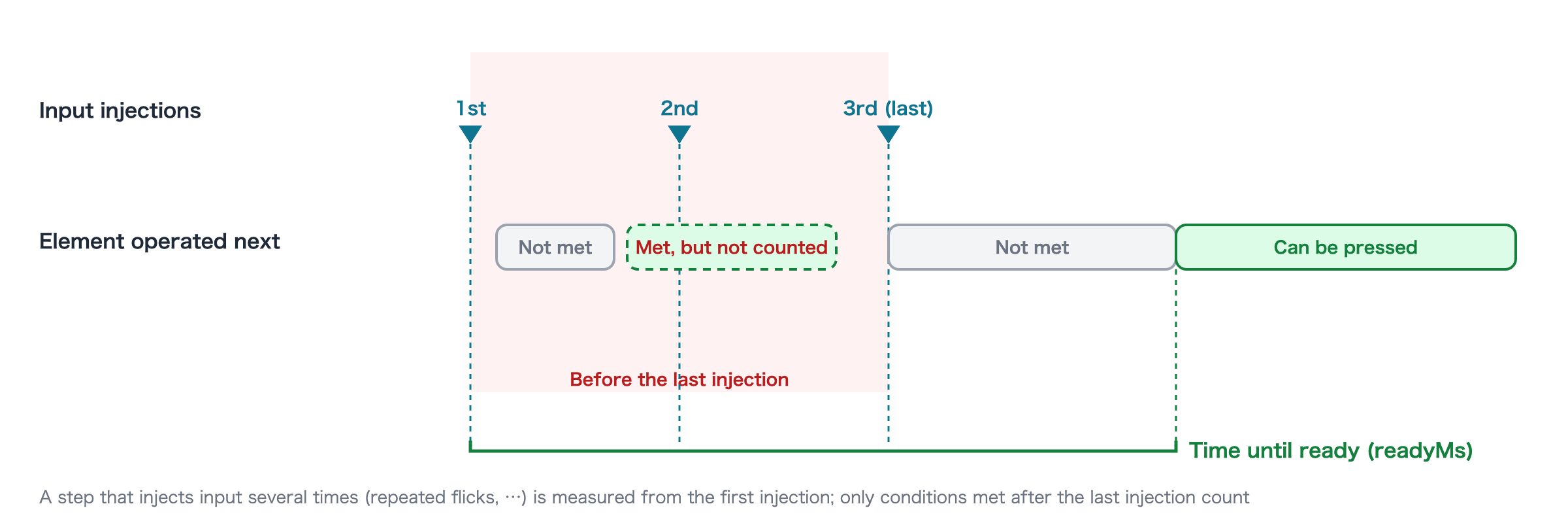
A step that injects input several times in one action (searching by scrolling, repeated flicks, …) is measured from the first injection, and only conditions met after the last injection count.
-
Run measurements while the device is not used for anything else. The monitor hold applies only within the clone that started the run.
Measuring on an iOS physical device
- On iOS, time to first frame is recorded with Xcode Instruments (
xctrace) during the run and filled into the results when the run ends. Xcode must be installed and able to record the device with Instruments. If recording fails, the run prints one line saying so and leaves the value empty. - Time to first frame also includes the time XCUITest takes to deliver the input to the device (it reads longer than on Android).
- On iOS, time to first frame is the first screen update after the input. Instruments records updates of the whole screen, so an update from something other than the app (the status bar, …) that comes first is counted.
- An Instruments recording does not keep its last few seconds, so the run keeps recording for 5 seconds after the end before stopping.
If saving still lags behind, the last measured step of the run has no time to first frame (it is left empty, not reported as
noFrame). - Time until ready never reads shorter than about 0.7 seconds, because reading the screen's element information takes a few
hundred milliseconds each time (on an iPhone SE3, a tab bar that stays pressable through the transition reads about 0.7 seconds,
against a few milliseconds on Android). Differences shorter than that cannot be told apart (
observedReadsin the result JSON is the number of reads the judgement could use). - The device's Reduce Motion setting cannot be changed by the tool; the device is measured with its own setting.
Related: Measuring app responsiveness (procedure) / Run profile / Analyzing results (fleetest results, dashboard) / Running scenarios